

You invest in content, optimize keywords, build backlinks, improve product pages, and follow SEO best practices but your website still struggles to gain visibility.
Could website speed be part of the problem?
The relationship between website speed and SEO is often misunderstood. A slow website does not automatically dis appear from Google, and a fast website is not guaranteed to rank first. Search rankings depend on many signals, including content relevance, quality, authority, usability, links, and how well a page satisfies search intent.
But speed still matters.
A slow website can frustrate visitors, delay access to important content, reduce engagement, hurt conversions, and contribute to a poor overall page experience. Google also considers Core Web Vitals within its broader ranking systems, making performance an important part of technical SEO and user experience.
In 2026, the stakes are even higher. Users expect immediate experiences across mobile, desktop, eCommerce, SaaS, and service websites. At the same time, search is evolving beyond traditional blue links through Google AI Overviews, AI Mode, answer engines, and AI-powered discovery.
That means your website should not only contain useful information. It should deliver that information quickly, clearly, and reliably.
So, how exactly do website speed and SEO work together? Can a slow website hurt Google rankings? Which performance metrics actually matter? And what should you fix first?
This guide answers those questions without the myths.
Does Website Speed Affect SEO Rankings?
Yes, website speed can affect SEO but not in the simplistic way it is sometimes presented.
Google considers Core Web Vitals as part of its broader page experience and ranking systems. However, excellent performance scores alone do not guarantee top rankings, just as poor speed does not automatically make a highly relevant page invisible.
Think of speed as part of a larger SEO ecosystem.
A page still needs to:
- Match search intent
- Provide genuinely useful content
- Be crawlable and indexable
- Work well on mobile devices
- Demonstrate relevance and authority
- Offer a usable and accessible experience
If two pages provide similarly strong answers to a search query, the page offering a faster, more stable, and more responsive experience may provide a better overall experience.
But the impact of poor performance goes beyond rankings.
A slow website can increase frustration, cause visitors to abandon pages, reduce conversions, and make it harder for users to engage with important content.
The correct question is therefore not simply:
“Is site speed a ranking factor?”
A better question is:
“Is my website fast enough to let users and search engines access, understand, and interact with my content without unnecessary friction?”
Why Website Speed Matters More in 2026
In 2026, website speed and SEO are increasingly connected through user experience, technical performance, and the ability to deliver valuable content without unnecessary delays.The modern web has become increasingly complex.
Websites now commonly include:
- High-resolution images
- Videos
- Third-party scripts
- Analytics tools
- Advertising tags
- Chat widgets
- Review applications
- Personalization systems
- Complex JavaScript frameworks
- AI-powered functionality
Each addition may provide genuine business value, but it can also increase page weight and processing requirements.
Meanwhile, user expectations continue to rise.
Someone arriving from Google does not care how many apps, plugins, scripts, or integrations are running behind your website. They expect the page to work.
If it takes too long for the main content to appear, buttons do not respond quickly, or the layout unexpectedly shifts while someone is trying to interact with it, the experience feels unreliable.
That is why the connection between site speed and SEO should not be treated as a technical checkbox. Performance affects how effectively your website delivers its actual value.
Core Web Vitals: The Speed Metrics That Matter for SEO
When discussing website speed SEO, it is important to move beyond one generic “load time” number.
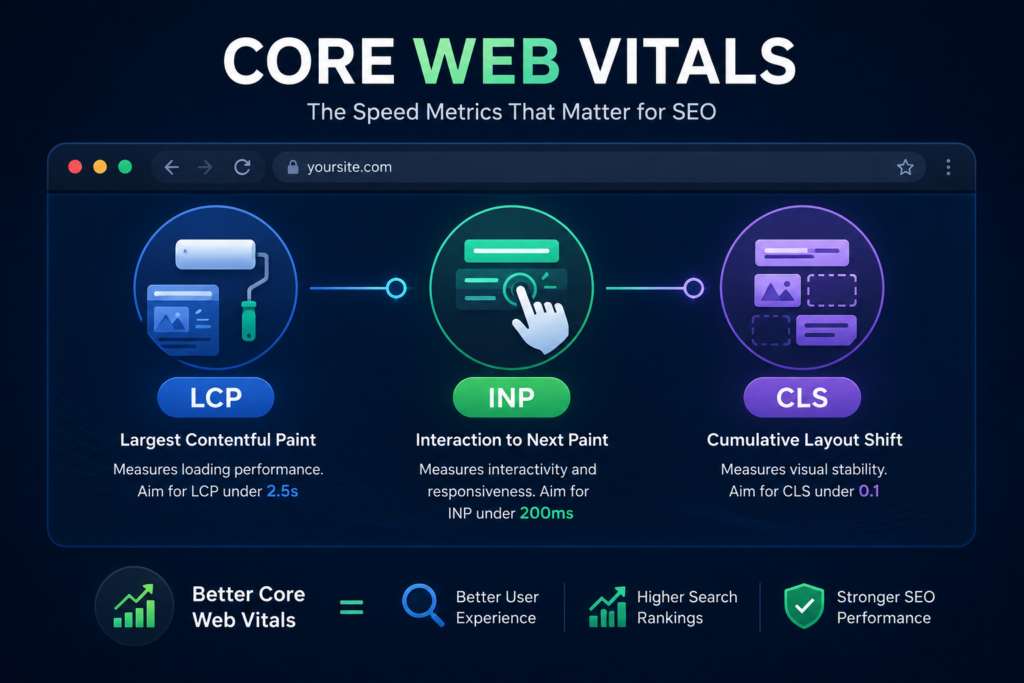
Google’s Core Web Vitals focus on three important areas of real user experience:
- Loading performance
- Interactivity
- Visual stability
The three Core Web Vitals are LCP, INP, and CLS.
Largest Contentful Paint (LCP)
LCP measures how quickly the largest visible content element within the viewport appears.
Depending on the page, this could be:
- A hero image
- A large heading
- A product image
- A banner
- A prominent content block
A good LCP experience is generally considered 2.5 seconds or less for at least 75% of page visits.
Common causes of poor LCP include:
- Large, unoptimized hero images
- Slow server response
- Render-blocking CSS or JavaScript
- Poor caching
- Delayed font loading
- Client-side rendering delays
If your most important above-the-fold content takes too long to appear, visitors may perceive the entire site as slow even if other elements load quickly afterward.
Interaction to Next Paint (INP)
INP measures responsiveness.
It evaluates how quickly a page visually responds after a user interacts with it, such as:
- Clicking a button
- Opening a menu
- Selecting a product variant
- Using a filter
- Expanding an accordion
- Adding an item to a cart
A good INP is generally 200 milliseconds or less for at least 75% of page visits.
Heavy JavaScript, long main-thread tasks, inefficient event handlers, and excessive third-party scripts can all hurt responsiveness.
This is particularly important for eCommerce stores and interactive applications. A page may appear loaded but still feel slow if users click something and nothing happens immediately.
Cumulative Layout Shift (CLS)
CLS measures visual stability.
Have you ever tried to click a button, only for an image, advertisement, banner, or font to suddenly load and move the button somewhere else?
That is layout shift.
A good CLS score is generally 0.1 or less.
Common causes include:
- Images without defined dimensions
- Dynamically injected content
- Late-loading banners
- Fonts that significantly change the layout
- Ads or embeds without reserved space
A visually unstable page is frustrating and can lead to accidental clicks, especially on mobile devices.
Website Speed and SEO: Direct Ranking Impact vs Business Impact
This distinction matters.
Website performance can contribute to the overall page experience, but many of its biggest consequences happen through actual user experience and business performance.
Imagine two online stores selling similar products.
The first store:
- Loads its main product image quickly
- Responds immediately when variants are selected
- Keeps the layout stable
- Makes browsing and checkout easy
The second store:
- Shows a blank hero area for several seconds
- Freezes when users choose a variant
- Shifts content unexpectedly
- Loads multiple intrusive popups
Even if both stores have excellent product descriptions, the first provides a better experience.
This can affect:
- Product discovery
- User trust
- Add-to-cart rates
- Checkout completion
- Repeat visits
- Brand perception
This is why improving website speed and SEO should not be seen as chasing a PageSpeed score. The real goal is reducing friction between the user and the action they want to complete.
Can a Slow Website Increase Bounce Rate?
The connection between website speed and SEO becomes especially important when slow performance causes users to leave before they can access the content they searched for.Potentially, yes but this topic requires nuance.
A slow website can cause visitors to leave before meaningfully interacting with the page. This is particularly likely when:
- The main content takes too long to appear
- The website seems frozen
- Mobile performance is poor
- Navigation does not respond
- Popups block access to content
- The layout keeps shifting
However, bounce rate alone should not be treated as a simple Google ranking factor.
A user can visit a page, find the exact answer they need, and leave without taking another action. That could still represent a successful experience.
The real problem is unsatisfied abandonment when visitors leave because the website prevents them from comfortably accessing what they came for.
For businesses, this distinction is critical.
The goal is not to artificially keep users on a page longer. The goal is to help them accomplish their objective efficiently.
Mobile Website Speed Can Be the Difference Between Visibility and Frustration
Mobile performance deserves special attention.
A website that feels fast on a powerful office computer with high-speed internet may perform very differently on:
- Mid-range smartphones
- Older devices
- Slower mobile connections
- Congested networks
- Users in different geographic locations
This is why testing only from your own laptop can create a false sense of confidence.
Mobile users may experience:
- Slower image downloads
- Longer JavaScript execution
- Delayed interactions
- Layout shifts
- Poor navigation responsiveness
For international businesses targeting users across the USA, UK, UAE, Canada, Australia, and other markets, geographic server distance and network conditions can also influence performance.
A strong website performance strategy should therefore consider real users, not just ideal laboratory conditions.
Why a 100/100 PageSpeed Score Is Not the Real Goal
Many website owners become obsessed with reaching 100/100 in PageSpeed Insights.
That can become a distraction.
A perfect laboratory score does not automatically mean:
- Your SEO strategy is strong
- Your content satisfies search intent
- Your website converts visitors
- Your product pages are persuasive
- Your technical SEO is correct
- Real users experience perfect performance
Performance tools are diagnostic tools, not business scoreboards.
The right objective is to identify meaningful bottlenecks and improve the user experience without breaking essential functionality.
For example, removing every script might increase a performance score but what if those scripts power:
- Search
- Reviews
- Payments
- Analytics
- Accessibility
- Personalization
- Customer support
Optimization requires judgment.
The question is not:
“How can we remove everything?”
It is:
“Which resources provide genuine value, which are unnecessarily expensive, and how can important functionality be delivered more efficiently?”
How Website Speed Affects eCommerce SEO and Conversions
Website performance is an important part of the best SEO practices for ecommerce, especially because online stores are often more technically complex than standard informational websites.For online stores, website speed and SEO work together to support product discovery, usability, customer trust, and the overall shopping experience.
eCommerce websites commonly contain:
- Large product images
- Product videos
- Variant selectors
- Reviews
- Recommendation widgets
- Search and filtering
- Tracking pixels
- Live chat
- Subscription applications
- Upsells and cross-sells
- Payment integrations
Each tool may seem harmless individually. Together, they can significantly increase page complexity.
For an eCommerce store, poor performance can create friction at every stage.
Collection pages: Slow product grids can make browsing frustrating.
Product pages: Delayed images, variant changes, or add-to-cart actions can reduce confidence.
Cart: Slow updates may make customers wonder whether their action worked.
Checkout: Unnecessary friction close to payment can contribute to abandonment.
One of the best SEO practices for ecommerce is therefore to evaluate performance not only at the homepage level, but across the complete customer journey.
A fast homepage cannot compensate for a slow product page or a frustrating cart experience.
Shopify Website Speed and SEO
Shopify provides managed infrastructure, but a Shopify store can still become slow because of theme code, excessive apps, third-party scripts, large media files, tracking tools, and customizations.
Common Shopify performance problems include:
- Too many app scripts
- Apps that were removed but left code behind
- Oversized product images
- Heavy sliders and animations
- Duplicate JavaScript libraries
- Excessive tracking pixels
- Poorly optimized custom Liquid or JavaScript
- Third-party review and recommendation widgets
The solution is not automatically to uninstall every app.
Instead, evaluate what each app loads, where it loads, whether it is actually used, and whether its business value justifies its performance cost.
For stores investing in Shopify development and SEO, performance should be considered during theme customization not treated as an emergency after the store becomes slow.
WordPress Website Speed and SEO
WordPress performance varies significantly depending on hosting, themes, plugins, page builders, caching, databases, and custom code.
Common causes of slow WordPress websites include:
- Cheap or overloaded hosting
- Excessive plugins
- Heavy page builders
- Unoptimized images
- Poor database maintenance
- No page caching
- Outdated PHP or software
- Excessive external requests
- Bloated themes
- Security issues or malicious scripts
Installing another optimization plugin is not always the answer.
Sometimes the plugin stack itself is part of the problem.
The most effective approach is to identify the actual bottleneck before making changes.
How AI Search Changes the Importance of Website Performance
As search evolves, website speed and SEO remain important parts of building a technically accessible website that both users and automated systems can navigate efficiently.Search is no longer limited to ten blue links.
Users increasingly discover information through:
- Google AI Overviews
- AI Mode
- AI assistants
- Answer engines
- Voice interfaces
- Generative search experiences
Does this mean a fast website is automatically more likely to be cited by AI systems?
No. That would be an oversimplification.
AI visibility can depend on factors such as content quality, clarity, relevance, authority, entity understanding, source reliability, and whether information can be extracted and interpreted effectively.
However, technical quality still matters.
A website that is difficult to crawl, heavily dependent on delayed client-side rendering, unstable, poorly structured, or inaccessible may create unnecessary barriers for both traditional search systems and other automated systems trying to understand its content.
For AI Search and Generative Engine Optimization, focus on:
- Clear page structure
- Direct answers
- Descriptive headings
- Original expertise
- Consistent business information
- Strong internal content relationships
- Accessible content
- Structured data where appropriate
- Fast and reliable delivery
The goal should not be to optimize for an imagined secret AI ranking factor.
The goal is to make your website technically accessible, semantically clear, genuinely useful, and easy for humans and machines to understand.
How to Improve Website Speed and SEO Without Breaking Your Site
If you want to improve website speed and SEO, avoid making random changes based solely on one automated report.
Start with diagnosis.
1. Measure Both Lab and Real-User Data
Performance tools can show laboratory tests and, when sufficient data exists, real-user experience data.
Look beyond the headline score.
Pay attention to:
- LCP
- INP
- CLS
- Time to First Byte
- Main-thread work
- Render-blocking resources
- Image delivery
- JavaScript execution
2. Optimize Images Properly
Images are often among the heaviest resources on a webpage.
Consider:
- Correct dimensions
- Modern formats where appropriate
- Compression
- Responsive image delivery
- Lazy loading below-the-fold images
- Prioritizing critical above-the-fold imagery
Do not blindly lazy-load the main hero image if it is the LCP element. Delaying it can make performance worse.
3. Reduce Unnecessary JavaScript
JavaScript can delay rendering and responsiveness.
Audit:
- Unused libraries
- Duplicate scripts
- Third-party widgets
- Tag managers
- App scripts
- Heavy animations
The objective is not zero JavaScript. It is purposeful JavaScript.
4. Improve Server Response and Caching
A slow server creates delays before the browser can even begin rendering useful content.
Depending on your platform, improvements may include:
- Better hosting
- Full-page caching
- Object caching
- CDN usage
- Database optimization
- Efficient backend queries
- Edge delivery
5. Load Third-Party Scripts Carefully
Analytics, chat widgets, heatmaps, advertising scripts, social embeds, and review tools can all affect performance.
Ask:
- Is this tool still used?
- Does it need to load on every page?
- Can it load later?
- Is there a lighter alternative?
- Does its value justify its performance cost?
6. Fix Layout Shifts
Reserve space for images, videos, banners, advertisements, and dynamic content.
A visually stable site feels faster and more trustworthy even when total load time remains similar.
7. Prioritize the Pages That Matter Most
Do not begin by optimizing a low-traffic page while your highest-value product, service, or landing pages remain slow.
Prioritize:
- Pages receiving organic traffic
- High-converting pages
- Important product pages
- Key service pages
- Pages failing Core Web Vitals
- Templates affecting many URLs
This is where site speed SEO becomes strategic rather than purely technical.
Common Website Speed Mistakes That Can Hurt SEO and Conversions
Performance optimization can go wrong when changes are made without understanding their consequences.
Installing Multiple Caching Plugins
More optimization plugins do not automatically create more optimization. Conflicting caching, minification, and lazy-loading systems can break layouts or duplicate work.
Compressing Images Until Quality Is Poor
Fast websites still need to look professional. Excessive compression can damage product presentation and brand trust.
Delaying Important Scripts
Deferring or delaying JavaScript without understanding dependencies can break menus, forms, variant selectors, carts, tracking, or accessibility features.
Optimizing Only the Homepage
SEO traffic often enters through blog posts, product pages, collection pages, and service pages.
Test the templates that users actually land on.
Ignoring Real-User Data
A laboratory test is a controlled simulation. Real users may have different devices, networks, locations, and behavior.
Use both types of data when possible.
Chasing Scores Instead of Outcomes
Moving from 97 to 100 may have less business value than improving a critical product page from a genuinely poor experience to a good one.
Prioritize impact.
A Practical Website Speed and SEO Checklist for 2026
Before investing in more content or advertising, review whether your website:
- Loads important above-the-fold content quickly
- Has good or improving Core Web Vitals
- Responds promptly to user interactions
- Avoids unexpected layout shifts
- Uses properly sized and compressed images
- Limits unnecessary JavaScript
- Loads third-party scripts strategically
- Uses effective caching
- Performs well on mobile devices
- Works across important geographic markets
- Keeps essential functionality intact after optimization
- Provides clear, useful, search-intent-focused content
- Is crawlable and indexable
- Uses descriptive headings and logical content structure
- Makes important information accessible to users and search systems
This combination matters more than chasing a single performance number.
So, Is Your Slow Website Costing You Rankings?
Possibly but rankings are only part of the risk.
A slow website can also cost you:
- Visitors
- Leads
- Sales
- Customer trust
- Engagement
- Advertising efficiency
- Repeat business
The relationship between website speed and SEO is not about one magic number or one guaranteed ranking boost.
It is about reducing technical friction so that your content, products, and services have a better opportunity to perform.
A fast website with weak content will not automatically dominate Google.
Excellent content on a painfully slow, unstable, or unresponsive website may also underperform its potential.
The strongest approach combines:
Useful content + technical accessibility + strong user experience + clear search intent + reliable performance.
In 2026, that balance matters not only for traditional Google Search, but also for eCommerce discovery, AI-powered search experiences, and increasingly competitive digital markets.Ultimately, website speed and SEO should support the same goal: helping people find useful content and access it quickly without technical friction.
Why Website Performance Should Be Part of Every SEO Strategy
Website speed and SEO should never be treated as completely separate strategies. A technically optimized website helps users reach valuable content faster, interact with important features more smoothly, and navigate pages without unnecessary delays. When businesses improve website speed and SEO together, they can create a stronger foundation for search visibility, user experience, and conversions.
However, improving website speed and SEO is not about repeating keywords or chasing a perfect performance score. The real goal is to remove technical friction while keeping content useful, accessible, and relevant. A balanced approach to website speed and SEO can help businesses build websites that perform better for users, search engines, and increasingly AI-powered discovery
Frequently Asked Questions
Does website speed affect SEO in 2026?
Yes. Website performance and Core Web Vitals can contribute to Google’s broader assessment of page experience, but speed is not the only factor that determines rankings. Content quality, relevance, authority, search intent, technical SEO, and many other signals also matter.
What is a good website loading speed for SEO?
There is no single universal total loading-time target that guarantees better rankings. For Core Web Vitals, commonly recommended thresholds include an LCP of 2.5 seconds or less, INP of 200 milliseconds or less, and CLS of 0.1 or less, evaluated at the 75th percentile of page visits.
Can improving website speed increase Google rankings?
It can help, particularly when poor performance is contributing to a bad page experience. However, improving speed alone does not guarantee higher rankings. Strong results usually require a combination of useful content, technical SEO, relevance, authority, and good performance.
Does PageSpeed Insights score affect SEO directly?
The 0–100 PageSpeed Insights performance score itself should not be confused with a direct Google ranking factor. It is primarily a diagnostic measurement based on Lighthouse lab testing. Core Web Vitals and the wider user experience should be considered alongside the broader SEO picture.
How can I improve website speed and SEO at the same time?
Start by identifying genuine performance bottlenecks. Optimize images, reduce unnecessary JavaScript, improve server response, use caching appropriately, control third-party scripts, fix layout shifts, and prioritize high-value pages all without compromising content quality or essential functionality.
Is website speed more important for eCommerce SEO?
Performance is especially important for eCommerce because users interact with product images, filters, variants, carts, reviews, recommendations, and checkout processes. Poor performance can create friction that affects both user experience and conversions.
Does website speed affect AI Search and Google AI Overviews?
There is no simple rule that faster websites automatically receive more AI citations or AI Overview visibility. However, technically accessible, crawlable, clearly structured, and reliable websites can reduce barriers for systems trying to access and understand their content.
Is Your Website Fast Enough to Compete in 2026?
Website performance should not be treated as a one-time technical task or a race to achieve a perfect score.
It should support a larger goal: helping users access your content, understand your business, and take action without unnecessary friction.
At 3BTech, we help businesses improve websites through technical optimization, SEO strategy, web development, Shopify development, and digital solutions designed around real business goals.
Whether your website is struggling with poor Core Web Vitals, slow mobile performance, excessive scripts, heavy images, Shopify app bloat, or WordPress performance issues, the right solution starts with identifying the actual bottleneck.
Your website does not need to be perfect. It needs to be fast, useful, reliable, and ready to support growth.
CTA Button: Get a Website Performance Review